SMS opt-in workflow
Effective October 4, 2026
Account settings and separate SMS choices
Humor Study is operated by Sparkling Javascript, Inc. Participants sign in with Google, open Settings, and make separate choices for verification texts and study reminders. Contact michael@sparklingjavascript.com for help.
The screenshots below show the actual application controls rendered with demonstration account details. They do not contain participant information. The forms themselves are available inside the signed-in account; this explanation and both screenshot links are public.
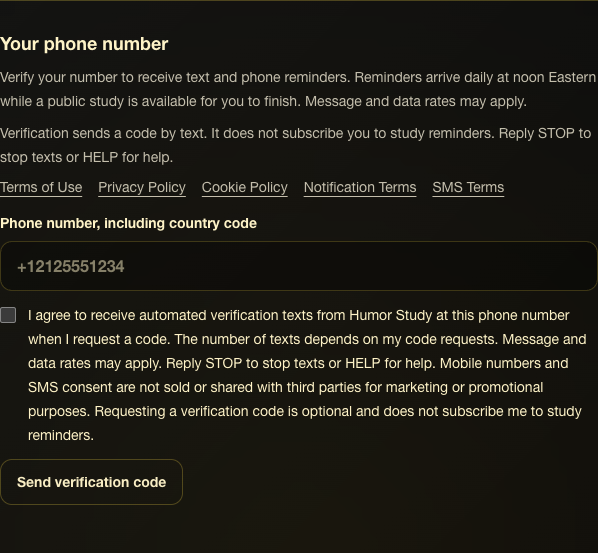
1. Enter a phone number and consent to a verification text
Enter a phone number including its country code. The separate verification-text checkbox starts unchecked. Check it and select Send verification code only when you want a code, then enter the received code to verify number ownership. A code request does not subscribe you to study reminders.
The checkbox names Humor Study and verification texts and discloses request-based frequency, possible message and data charges, STOP and HELP, and the prohibition on selling or sharing mobile information and SMS consent for third-party marketing. Privacy and SMS Terms links appear beside the phone form.
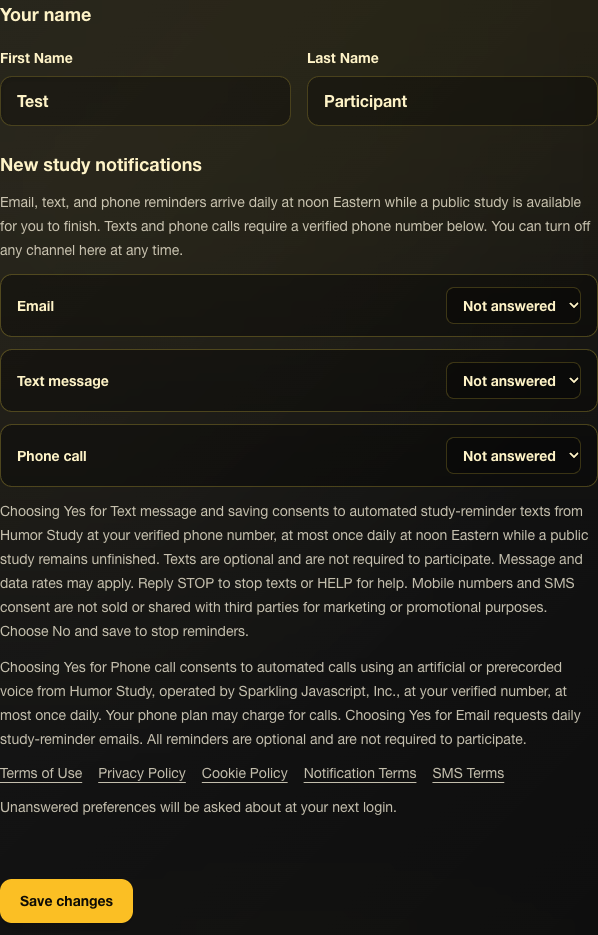
2. Independently choose whether to receive study reminders
In Settings, select Yes for Text message and Save changes to subscribe to automated study-reminder texts. New accounts start with Not answered; No and Not answered never subscribe an account. The separate post-login question also allows Yes, No, or Skip. Email and phone-call choices do not enable SMS.
Reminders are optional, require a verified phone number, and arrive at most once daily at noon Eastern while an active public study remains unfinished. The consent text identifies Humor Study, explains possible message and data charges and STOP/HELP, links to the policies, and prohibits selling or sharing mobile numbers or SMS consent for third-party marketing.
Stopping reminders
Choose No for Text message and save in Settings to stop study reminders, or reply STOP to block texts from the sending number. Reply HELP for assistance. START removes the sending-number block; study reminders still require a saved Yes choice and a verified phone number.